Pandas Tutorials & Data Analysis
In today’s world, data is everywhere. From Excel sheets and CSV files to application logs, monitoring metrics, and database records, almost every system generates data continuously. The real challenge is not collecting data, but understanding, cleaning, and analyzing it efficiently.
This is where Pandas comes in—a library whose name stands for Python Data Analysis. It is one of the most powerful and widely used Python libraries for data analysis and manipulation. At Byte2Build, we focus on understanding technology from the root. In this series, we won’t just learn commands; we will learn why Pandas exists, what problems it solves, and how it is used in real engineering jobs.
PD1.1: What is Pandas?
Pandas is an open-source Python library designed to make data handling and analysis easy and fast. It provides powerful data structures that allow you to work with tabular data, similar to spreadsheets or database tables.
The name is derived from "Panel Data"—an econometrics term for multidimensional structured data sets. It was developed by Wes McKinney in 2008 to bridge a specific gap in the Python ecosystem: the need for a high-performance, flexible tool for financial data analysis.
Ecosystem Integration
Pandas serves as the "connective tissue" within the Python data stack, integrating seamlessly with other specialized libraries:
- NumPy: Handles underlying high-performance numerical and array operations.
- Matplotlib & Seaborn: Used for data visualization to turn raw numbers into graphical insights.
- SciPy: Essential for advanced statistical analysis and scientific computing.
- Scikit-Learn: The industry standard for building and implementing machine learning models.
PD1.2: Capabilities & Solution Matrix
Pandas allows you to perform tasks that would otherwise require complex loops and manual logic. What used to take dozens of lines of code can often be done in just one or two clear statements.
| What Pandas Does | Problems It Resolves | Where It Is Used |
|---|---|---|
| Reads Data: Loads CSV, Excel, SQL, and JSON in one line. | Manual Parsing: No more writing complex code to open raw files. | Data Science: Importing large datasets for research. |
| Data Cleaning: Detects missing values (NaN) or removes duplicates. | Messy Data: Replaces error-prone manual "search and replace" logic. | AI & ML: Essential preprocessing for models. |
| High-Speed Filtering: Selects specific rows/columns via conditions. | Slow Performance: Replaces slow loops with fast vectorized math. | DevOps: Filtering millions of lines of system logs. |
| Data Aggregation: Groups data to calculate sums or averages. | Complexity: Simplifies "Pivot Table" logic into a single command. | Finance: Analyzing transaction trends and forecasting. |
PD1.3: Basic Operations in Pandas
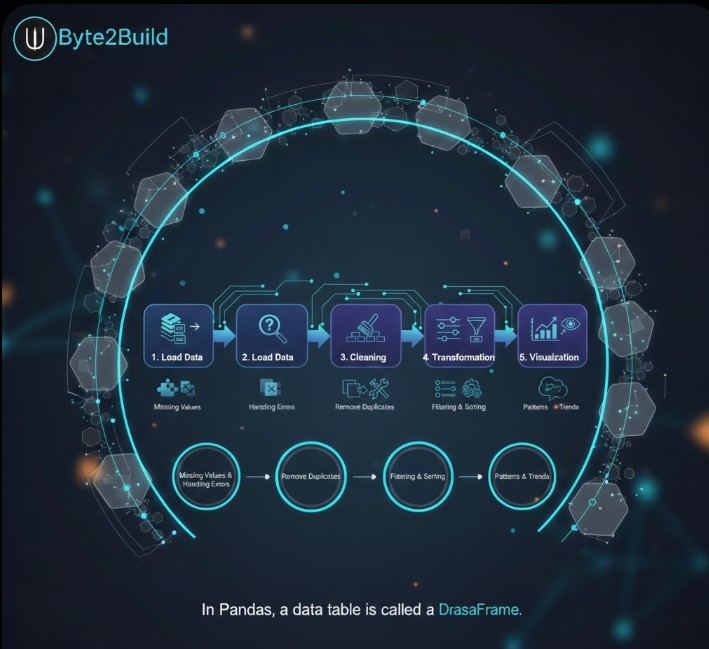
In Pandas, a data table is called a DataFrame. In a professional environment, data processing follows a structured lifecycle:
Load Data → Preprocessing → Cleaning → Transformation → Visualization
- Preprocessing: Identifying and handling missing values within the data to prevent calculation errors.
- Cleaning: Removing duplicate records and fixing formatting inconsistencies to ensure data integrity.
- Transformation: Using filtering, sorting, and data modification to prepare specific subsets of data for analysis.
- Visualization: Representing the final processed data graphically to uncover hidden patterns and trends.
Filtering Data on Conditions: Selecting or filtering specific rows and columns is a core requirement of data engineering. Pandas provides highly efficient methods for slicing, selecting, and extracting precisely the data you need using logical conditions.
Plotting: Pandas provides plotting capabilities for your data out of the box by leveraging the power of Matplotlib. You can select the specific plot type (such as scatter, bar, or boxplot) that best corresponds to your data structure.
The Power of Vectorization: In professional data engineering, there is no need to manually loop over rows to perform calculations. Data manipulations on a column work element-wise. This approach allows you to perform operations on an entire dataset simultaneously, ensuring high performance.
DataFrame Versatility: In Pandas, a data table is called a DataFrame. Engineering new data—such as adding a column to a DataFrame based on existing data in other columns—is straightforward and efficient.
Statistical Aggregations: Basic statistics (mean, median, min, max, and counts) are easily calculable. These or custom aggregations can be applied to the entire dataset, a sliding window of data, or grouped by categories. The latter is also known as the split-apply-combine approach.
Understanding the technical lifecycle of a DataFrame is the foundation; now, we must build the laboratory where that data lives. We shift our focus from theoretical structures to Establishing the Engineering Environment, ensuring your local workspace is isolated, optimized, and ready for high-scale analysis.

PD2: Establishing the Engineering Environment
Pandas is Python laborious, meaning it relies on high-performance C-extensions. To ensure system stability, we isolate our workspace using Virtual Environments. This prevents version conflicts with your OS-level Python tools.
PD2.1: Python Pandas Installation via PIP
Pandas requires Python 3.8 or above. Before installation, you must verify your engine version and provision a sandbox environment.
Engine Verification & Sandbox Provisioning
# Check Python Version (Must be 3.8+)
python3 --version

# Create and Activate Virtual Environment
python3 -m venv pd_env
source pd_env/bin/activateInstalling from PyPI
With the sandbox active, we install the latest stable version of Pandas directly from the Python Package Index.
# Update pip and install pandas
pip install --upgrade pip
pip install pandas

# The Heartbeat Check
python -c "import pandas as pd; print(f'Version: {pd.__version__}')"/* Subtle Divider */PD2.2: Anaconda Pandas Installation
For data scientists using the Anaconda ecosystem, we utilize the conda manager to handle complex binary dependencies automatically.
Conda Environment Deployment
# Create and switch to environment
conda create --name byte_env python=3.10
conda activate byte_env

# Install pandas via Anaconda Cloud
conda install pandasPD2.3: Common Errors & Engineering Resolutions
When deploying Pandas, you may encounter environment locks or pathing errors. Use the following resolutions to maintain uptime.
| Scenario / SEO Error | Engineering Resolution |
|---|---|
| externally-managed-environment | Modern Linux protection. Use PD2.1 to create a venv instead of global install. |
| ModuleNotFoundError: No module named 'pandas' | The environment is inactive. Run source pd_env/bin/activate or conda activate. |
| Command 'pip' not found | Install the package manager: sudo apt install python3-pip (Ubuntu/Debian). |
Learn one command, master one concept, grow one byte at a time.